Billo guides
How to Keep Track of Bills on iPhone
To keep track of bills on iPhone, put every due date in one place, review the next week before it begins, and record each payment when it happens. You can do this in Reminders or a calendar. Billo brings the upcoming list, month calendar, reminders and payment history into one bill-focused view.
Put every bill in one place
A bill list works only if it includes the dates you might otherwise forget. Begin with the bills you pay each month, then add less frequent items such as insurance renewals or annual memberships. For each one, record its name, amount, due date and repeat schedule. Add the provider’s payment link or a short note if that helps you act later.
The Consumer Financial Protection Bureau’s bill calendar uses the same basic idea: put obligations on the dates when they need attention. A phone makes that calendar easier to carry, but the record still needs regular upkeep. If a provider changes the due date or amount, update your list when you see the notice.
You can start with a dedicated Bills list in Apple Reminders. Give each item a due date and set it to repeat. If you want amounts, payment status and a monthly view together, Billo is built for that job. In Billo, tap +, enter Name, Amount and Due Date, choose Repeat where needed, and save the bill.
Review the next seven days before they arrive
Choose one day each week to look ahead. Check what is due over the next seven days and what will come out before your next paycheck. This turns a vague feeling that “something is due” into a short list you can act on.
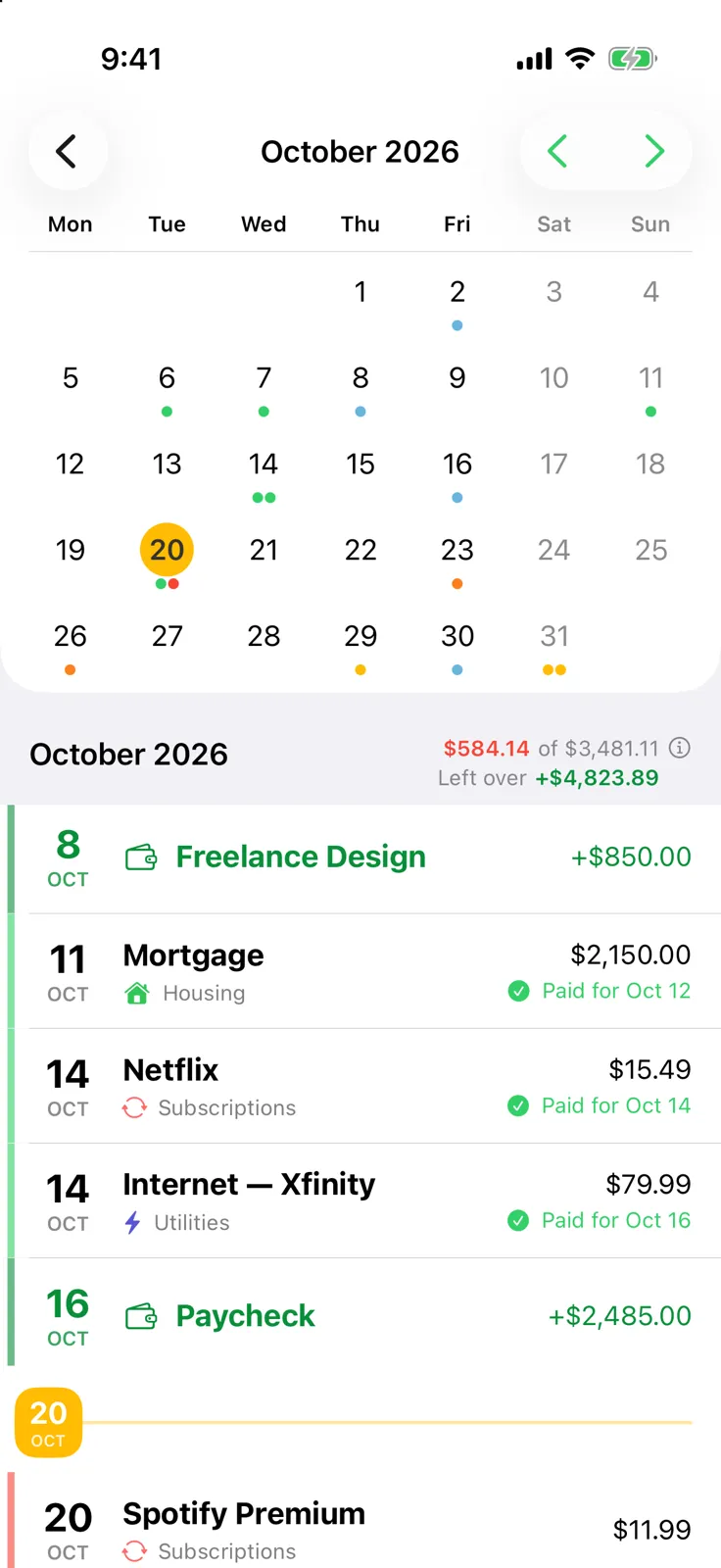
Billo’s Bills screen separates Today, Next 7 Days and Next 30 Days and shows totals. Its calendar puts bill and paycheck dates on a month view; tapping a day shows what is due or already paid. The month breakdown shows income, bills, what has been paid so far and what remains. These are planning views based on the details you entered, so confirm the final amount with each provider before paying.
If you use Reminders instead, sort or review your scheduled items by date and keep bill amounts in notes. Apple’s Reminders guide explains the dated-task workflow, and scheduled reminders can also appear in Apple Calendar.
Set alerts, then mark each payment
A reminder is most useful before the due date, when you still have time to act. In Apple Reminders, add an Early Reminder to a dated item. In Billo, open Settings → Notification Settings to choose advance days and Day of for all bills. Follow how to set bill reminders on iPhone for exact steps.
After you pay through your bank or provider, record it immediately. Complete the task in Reminders or mark the bill occurrence paid in Billo. Billo then stops reminders for that occurrence and keeps its payment history. If a bill is set to be paid automatically, Billo can record it automatically, but you should still check the provider or bank when you need confirmation that the payment went through.
Disclosure: Billo is made by this article’s author, Jiří Urbášek. It organizes bills you enter; it does not connect to a bank or make payments.
Close the month with a five-minute check
At month’s end, scan for anything still unpaid, check that recurring dates look right, and correct any amount that changed. Keep the method simple enough that you will repeat it. If your needs are mostly date alerts, Apple Reminders may be enough. If you want a dedicated list, calendar and payment history, use Billo’s bill-focused views.
Frequently asked questions
What details should I record for each bill?
Start with the name, amount, due date and whether it repeats. Add a payment link or account reference only if it helps you act, and keep sensitive information out of shared notes.
Can I track bills without connecting a bank account?
Yes. A calendar, Reminders list or Billo all work with bills you enter yourself. Billo uses your Apple account for private iCloud sync and does not request bank login details.
Does Billo show which bills I have already paid?
Yes. Billo shows paid status in its calendar and keeps a payment history for each bill. Mark a payment after you make it through your usual provider.