Billo guides
Best Bill Reminder Apps for iPhone
The best iPhone bill reminder depends on what you need to track. Apple Reminders handles simple alerts. Billo organizes bills across Apple devices; Bills Organizer & Reminder handles varied schedules; Bill Tracker adds bank-linked tracking; Bills Manager emphasizes on-device records. Chronicle suits sharing, while Subd focuses on subscription renewals across Apple devices.
Quick picks
- For a bill-focused list and calendar across Apple devices: Billo.
- For sharing bill records with someone else: Chronicle.
- For varied repeat intervals and account views: Bills Organizer & Reminder.
- For bill reminders alongside bank-linked transactions and budgeting: Bill Tracker.
- For a bill record kept on your iPhone: Bills Manager.
- For subscription renewals across iPhone, iPad and Mac: Subd.
- For a straightforward alert and completed task: Apple Reminders.
How this comparison was made: On October 20, 2026, we checked each app’s US App Store description, update history and Apple’s current Reminders guide. We also reviewed an archive of Bills Organizer & Reminder App Store feedback collected in November 2025. User reviews describe individual experiences; they are not a test of the current build. We did not install and run every competing app, so this is a source-checked shortlist, not a hands-on speed, reliability or notification-delivery test. Features and device support can change; confirm them in the current listing before choosing. Disclosure: Billo and Subd are both made by the publisher of this article. We include each where its workflow fits and point out reasons to choose the other tools.
Compare the seven options
Features and device listings checked October 20, 2026. Links in the app names lead to the source for each row.
| App | Best fit | Devices | Main limitation |
|---|---|---|---|
| Billo | Focused bill list, calendar and payment history | iPhone, iPad, Mac | No bank linking or automatic charge discovery |
| Chronicle | Bill records you want to share | iPhone, iPad, Mac | English is its only listed language |
| Bills Organizer & Reminder | Varied repeat patterns and account views | iPhone, iPad | Last listed update April 2024; Mac app not listed |
| Bill Tracker | Bills alongside transactions and budgets | iPhone, iPad | Mac app not listed; wider finance scope |
| Bills Manager | Manual tracking on one iPhone | iPhone | Designed for iPhone; backup and restore are manual |
| Subd | Subscription renewals and payment history | iPhone, iPad, Mac | Focuses on subscriptions rather than general household bills |
| Apple Reminders | Dated tasks and alerts | iPhone and other Apple devices | No bill-specific amounts, totals or payment history |
The table describes the documented workflow, not a claim that every feature is equally easy to use. These apps solve different problems, so the most useful choice depends on whether you need only a prompt, a bill record, shared tracking or a subscription overview.
Billo: a bill-focused calendar and paid history
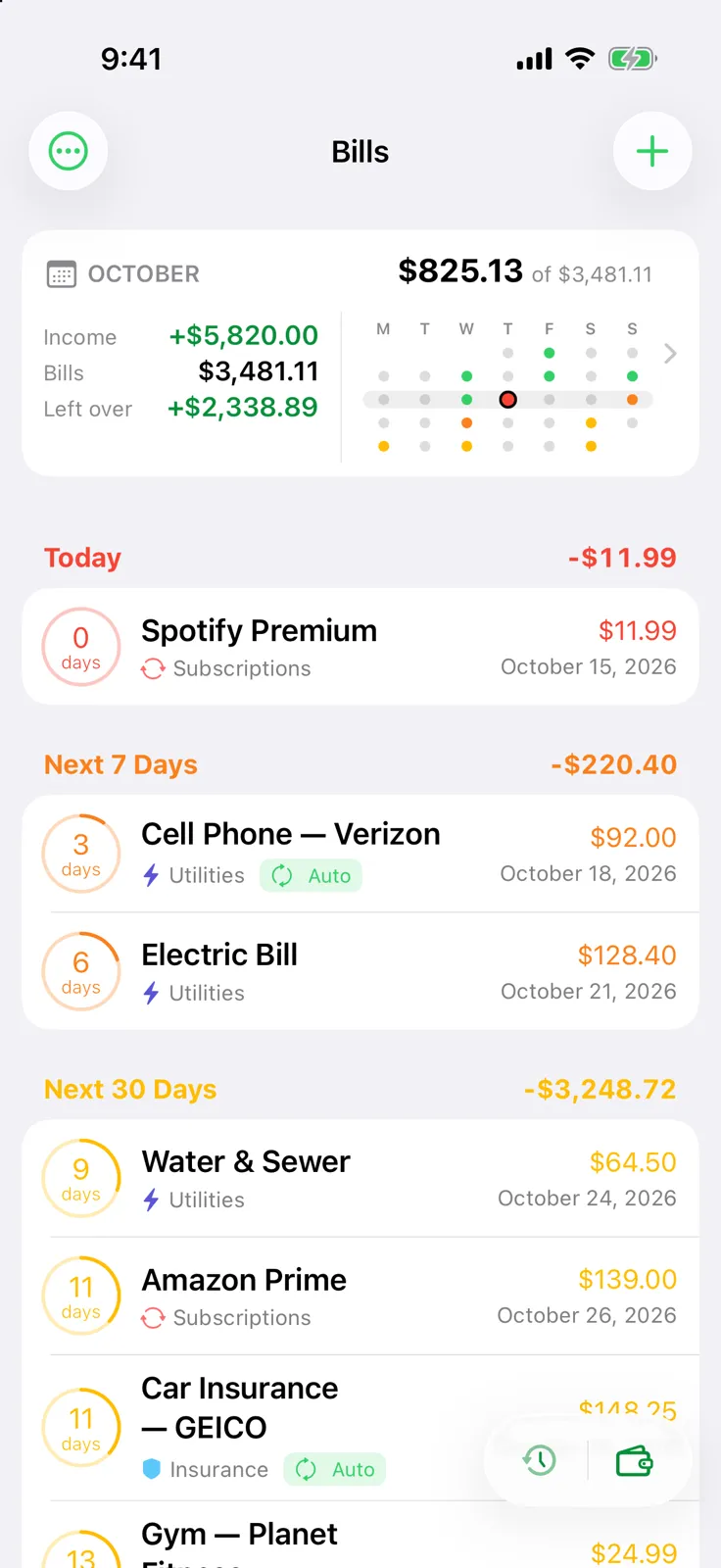
Billo’s App Store listing describes reminders, a bill calendar, payment history and syncing across iPhone, iPad and Mac. In Billo, you enter a name, amount and due date, set a repeat where appropriate, and choose reminder timing. The Bills screen groups upcoming items into Today, Next 7 Days and Next 30 Days. After you pay through your usual provider, you mark the occurrence paid; its reminders stop and its history remains.
This is our pick when you want to see what is due, what you have already paid and how the month looks in a focused app across your Apple devices. Limitation: Billo does not link to a bank account or discover charges automatically. You enter and maintain the bills yourself.
For a setup walkthrough, see how to set bill reminders on iPhone. The Billo screenshot above shows its actual upcoming-bills view.
Chronicle: bill records and sharing
Chronicle’s App Store listing describes recurring bill reminders, payment history with confirmation numbers, and sync across iPhone, iPad and Mac. It also describes sharing bills with a partner or another person through Chronicle Cloud. That makes Chronicle especially relevant when one person’s private list is not enough.
Choose Chronicle if confirmation numbers or a shared record are central to your process. Limitation: its current App Store listing names English as its only supported language. That matters if you need a bill organizer in another language. The listing is our source for its capabilities; this article does not assess how sharing behaves in daily use.
Bills Organizer & Reminder: more schedule choices
Bills Organizer & Reminder documents weekly, every-two-weeks, twice-monthly, monthly and quarterly repeats, among other intervals. Its listing also describes upcoming and paid views, a calendar, account management, payment history and alerts. It says you can mark a bill paid from a notification. The listed devices are iPhone and iPad.
Consider it when your bills follow several different repeat patterns or you want to organize them by account. Limitations: the US App Store’s latest listed release is dated April 10, 2024, and it does not list a Mac app. Our review archive includes a November 2025 report and a February 2025 report of the app failing to open. These individual reports do not establish how reliably it runs today, but the long gap since its listed update is a reason to check current support and compatibility. Before relying on any scheduled bill, inspect its next due date: every two weeks and twice a month are not interchangeable.
Bill Tracker: reminders inside a wider finance app
Bill Tracker’s App Store listing describes bill reminders, recurring schedules, a calendar, partial or full payment records, and widgets. It also describes optional connections to bank accounts through Plaid and Apple Card transaction import, alongside budgets and spending views. The listed devices are iPhone and iPad.
Choose it when you want bills in the same workflow as transactions and cash flow. Its bank-linked discovery is a meaningful difference from Billo’s manual-entry model. Limitations: the current listing does not name a Mac app, and its broader budget and transaction features may be more than you need for a straightforward bill schedule. Its listing also says manual entry is available. We have not tested the bank connection or its accuracy.
Bills Manager: a manual bill record on iPhone
Bills Manager’s App Store listing describes recurring bills, a monthly list, calendar, paid and upcoming status, account history, and customizable alerts. It says no registration, bank connection or internet is needed for ordinary use, and describes manual backup and restore. The US listing calls it an iPhone app.
This is a strong option if you want bill details kept on your phone and are comfortable managing backup yourself. Its documented photo attachments and local-first approach are useful distinctions. Limitations: the listing describes an iPhone app and manual backup and restore; it does not present a dedicated iPad and Mac bill workflow.
Subd: renewal reminders across Apple devices
Subd’s App Store listing describes an upcoming-renewals list, calendar, reminders, widgets and payment history. You can choose a service from its built-in catalog or enter your own. It also describes syncing through iCloud across iPhone, iPad and Mac, without a bank login or a separate account.
Subd is our pick when the recurring payments you care about are subscriptions and you want to review upcoming renewals and past payments on any of your Apple devices. Limitation: it is designed around subscriptions. Use Billo for a general list of household bills such as rent, utilities and insurance.
Apple Reminders: when a dated task is enough
Apple’s Reminders guide shows how to set a dated reminder to repeat and add an Early Reminder. Make a Bills list, create a task for each bill, and complete it when you have paid. Scheduled reminders can also appear in Apple Calendar.
Reminders is the simplest choice when your main need is “tell me to pay this.” Limitation: it is a general task system, so bill amounts, totals and payment history need your own notes or another record. Our Apple Reminders for bills guide shows the setup and where a dedicated tracker helps.
What about Fleur and Monthly Bill Planner?
Two more relevant organizer apps are Fleur and Monthly Bill Planner. Fleur’s current listing emphasizes budgeting, recurring transactions, account and spending views, and sharing a budget with a partner. Monthly Bill Planner describes bills, income, custom pay periods, paid status and planning groups. Both may fit a broader money-planning job.
Their current US App Store descriptions do not clearly document due-date reminder notifications, which is the core requirement for this shortlist. Check directly with the developers or in the apps if alerts are essential to you. We would include them in a broader bill organizer comparison once that behavior is verified.
How to choose
Start with the detail you most need to check later. If it is only whether you completed a payment task, use Reminders. If you need due amounts, a month calendar and each bill’s paid history on your Apple devices, try Billo. For shared bill records, investigate Chronicle. For unusual repeat patterns or account groupings, inspect Bills Organizer & Reminder. Bill Tracker suits a broader transaction view, Bills Manager suits a phone-local bill log, and Subd suits a subscription-heavy list across Apple devices.
Whichever app you choose, verify due dates and amounts with the provider, then confirm payments through the provider or bank. A reminder app organizes your plan; it is not proof that money moved. Our guide to tracking recurring bills and payment dates gives a routine you can use with any of these tools.
Frequently asked questions
Which iPhone app is enough if I only want a bill alert?
Apple Reminders can give each bill a due date, repeat and early reminder. Choose a dedicated bill tracker if you also want amounts, bill-specific views and payment records together.
Which of these apps can I use on Mac as well as iPhone?
The current US App Store listings show Billo, Chronicle and Subd on iPhone, iPad and Mac. Check the App Store compatibility section for your device before choosing.
Do I need to connect a bank account to use Billo?
No. You enter bills manually in Billo. It uses iCloud to sync across your Apple devices, and it does not move money or confirm that a bank payment cleared.